

Many organizations have a dedicated section on their corporate website for jobs and careers. With the Impactpool API integration, you will get all the jobs posted on Impactpool to appear instantly and automatically on your own jobs/careers page.
Does it sound magic! Yes, it is!
However, to get started you may need some support from your IT colleagues.
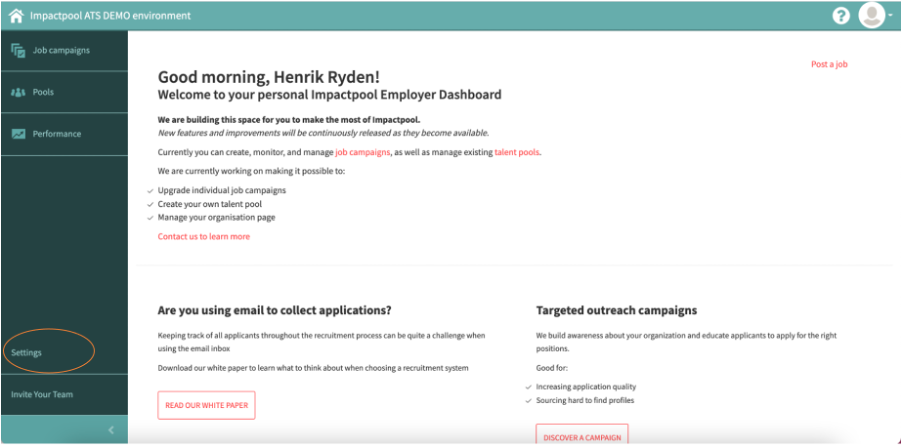
Step 1: To view the XML feed, press the [Settings] link in the left sidebar (marked in orange below).
This button is only available if you have the Superuser role in your organization.
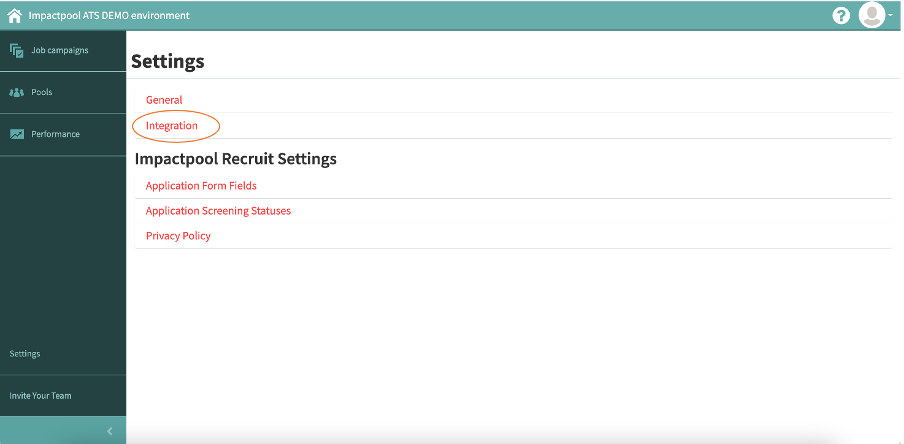
Step 2: Continue to press the [Integration] link (marked in orange below).
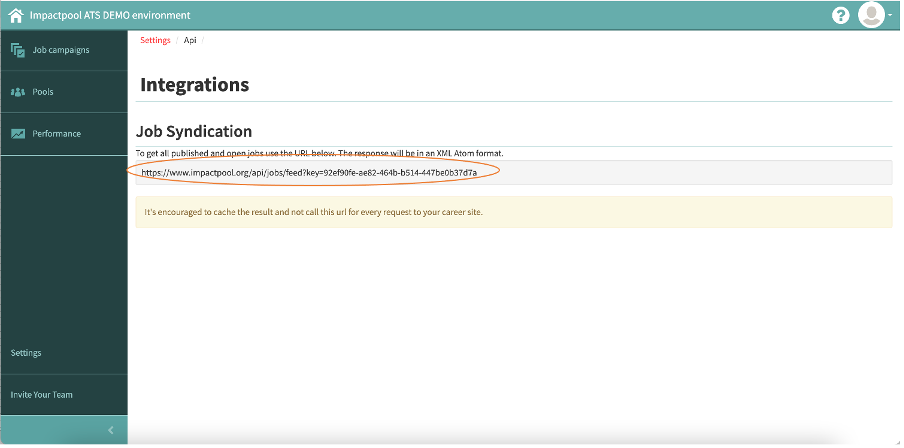
Step 3: By clicking the link you will receive a unique URL (marked in orange below). To get all published and open jobs use the URL. The response will be in an XML Atom format.
It's encouraged to cache the result and not call this URL for every request to your career site.
The feed is only visible if you have an active job posted, so in the event that you would like to set up the feed while having no jobs published, we recommend that you create a test job.
The XML feed contains the following fields:
Job URL on Impactpool
Job apply URL on Impactpool
Job Title
Organization
Location
Grade
Occupational Groups
Closing Date
Complete Job description